

A: The app is wherever your phone is! We’ve crafted a more mobile-friendly app (aka easier to read and use on a smaller phone screen) that offers a better shopping experience and a a great way to track orders & product launches from your phone. Now you can take a piece of Missouri Star with you wherever you go!

Introducing Your New Favorite Way to Shop!
Shop Missouri Star's famous Daily Deal and other great offers anytime, anywhere! The Missouri Star app is your ultimate crafting hub, making it easier than ever to shop for your quilting favorites.
Enjoy the latest sales, quick account management, and endless sew-along tutorials. You can also track orders, save favorite products, and manage your Quilter’s Cash Points with ease.
Download for FREE on the App Store or Google Play!


Why Download the Missouri Star App?
Our app makes it incredibly simple to track your purchases, bundles, Quilter’s Cash, and machine quilting orders. Not only is it free & easy, but you can find app-exclusive bonus deals and other treats!
Frequently-Asked Questions (FAQs)
Q: How is the Missouri Star quilting app different from the website?
Q: How do I download the app?
A: It’s so quick and easy! If you already have our previous version of the app, simply open it by tapping on the Missouri Star app icon. The app will automatically update and you’ll see a dial appear that shows the app loading. Once it's complete, just tap the same Missouri Star icon on your phone, and you’ll open the new app experience.
New to the Missouri Star mobile app? We’re here to walk you through the process and make it easy.
Step One: Open Google Play or the App Store on your mobile device. If this is not displayed on your home screen, you can find it through your settings > apps.
Step Two: Tap on the search bar at the top and type in Missouri Star.
Step Three: Tap the Missouri Star app with our company logo. Here’s what it looks like:

Step Four: Tap “install” to download the app on your mobile device. It may take a few minutes to install. You will get a notification when the installation is complete.
Step Five: Open the app to log in and enjoy exclusive offers and content!
Q: How do I log into my account on the app?
A: When you open the Missouri Star app, search for the “My Profile” icon in the upper left corner (the icon is of an outlined person). Tap the icon and a menu screen will open. At the top of this screen is a green bar that has a “log in” button. Tap the button to enter the email and password you use when you normally log in to our Missouri Star website. Then, simply tap the orange log-in button. You’ll know you’ve successfully logged in when your name, email, and Quilter’s Cash point balance is visible at the top of the page.
Q: Why should I use the quilt shopping app instead of my desktop computer?
A: We have made the app super easy to shop whenever and wherever you want! Once you’re on the app, you’ll see at the top colored “buttons” that you can easily click to get to bundles, the Daily Deal, Sale items and more!
Q: If I want to shop all products on the website, how do I do that on the app?
A: At the bottom of the app homepage, you’ll see an icon for “Shop All”:
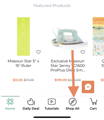
Q: Where do I find tutorials on the app?
A: Tutorials will not be available in this first version, but as soon as they are added we will let everyone know.
Q: Where do I find Quilter's Cash in the app?
A: If you tap on the “My Profile” icon in the upper left (icon is an outlined person), you’ll open a menu list and will see your current Qulter’s Cash points balance near the top. Tap “View Quilter’s Cash” to view your available rewards, ways to earn points, & history.
Q: How do I redeem Quilter's Cash points in the app?
A: To redeem points at checkout, tap "show order summary" at checkout, then use the drop-down menu to apply the amount of points you wish to redeem on your order. Once you have made your selection, tap the orange arrow button to apply the points to your order.
Q: How do I use the chat feature?
A: Just like on the Missouri Star website, there’s a chat bubble in the lower right corner of the app. If you tap this chat icon, you’ll be connected to a customer service representative who can help with your questions. Just tap one of the question buttons at the top or type in your message in the text block at the bottom of the chat window.
Q: Can I purchase gift cards on the app?
A: Gift cards are currently not available for purchase on the app - you will need to use your desktop computer to make a purchase. Gift cards can be redeemed on the app, however.
Q: Why can't I log into the app?
A: Our app recognizes the same email and password you use on missouriquiltco.com. You can log into the app even while you’re logged in on your computer! If you’re still having trouble, contact customer service.
Q: When I'm logged into my computer and then log into the app, what will show up/transfer?
A: Your Quilter’s Cash, shipping address and any saved payment methods WILL be available in the app when you’re logged in just as it is when you’re signed in on a computer. The same goes for your wishlist. Unfortunately, items in your cart will not transfer over on the app. You will have to recreate your cart. So you don’t lose any desired items, we suggest adding your cart items to your wishlist. Then, you’ll be able to see the items you want on both mobile and desktop.
Sew Many Reasons to Download the Missouri Star App!
Introducing the Missouri Star app– your ultimate companion for all things quilting! Whether you're a seasoned quilter or just starting the journey, our mobile app brings the world of sewing directly to your fingertips.
With the Missouri Star app, you'll gain access to a treasure trove of quilty content that will ignite your creativity. Imagine browsing through a curated collection of quilt kits, fabrics, and notions – all conveniently available for purchase right from your mobile device. Our app is your gateway to exploring a variety of quilting essentials, including batik fabrics, quilt patterns, and quilting kits, with bonus daily deals you’ll never want to miss. Plus, stay in the loop with the latest quilty news, tutorial releases, and updates on our Quilt Town events.
Explore tutorials, sew-as-you-go, and even sort them into lists of your favorites. You’ll never have to delay your project again because you’ll always be able to find the tutorial right at your fingertips.
Download the app to begin exploring our crafty haven– you can always revisit any products you browsed and saved for later! Our app is built to fuel your creativity and make stocking up on your quilting essentials a breeze. To give you a seamless shopping experience, your account management is built to be effortless and thorough. You can track your orders, revisit previously purchased products, manage your Quilter’s Cash Points, and so much more!
Ready to dive into the world of quilting-on-the-go? Download the Missouri Star app from your device’s app store to immerse yourself in a quilting paradise filled with app-exclusive offers, endless sortable tutorials, and easy account management to always be on top of your orders. And don’t forget to check in daily– you never know what sweet deals you might find, all with the convenience of shopping from anywhere.